Edited Photo Detector
Was this photo Photoshopped, retouched or AI-edited? Upload it to see what the file records: editing software, edit history, Adobe markers, Content Credentials edit actions and AI-assisted edits like Generative Fill. Then the AI image detector runs on the same photo.
Drop or paste a photo to check for edits
Editing software, edit history, Adobe markers, AI-assisted edits, then an AI-generated check.
Choose a photo →Tip: use the original file. Re-shares strip the traces this tool reads.
What the edited photo detector reads
- Editing software: the EXIF Software tag and XMP CreatorTool, which Photoshop, Lightroom, GIMP, Canva, Snapseed, Facetune and most editors write when they save.
- Edit history: the XMP history block Adobe apps keep (created, saved, converted, and which application did it).
- File markers: the Photoshop 8BIM resource block and the Adobe APP14 marker that Adobe applications leave in JPEGs.
- Date mismatch: a file date later than the date taken means the photo was re-saved after capture.
- Content Credentials edits: C2PA action records such as cropped, colour adjustments, edited or placed, with the application that made them.
- AI-assisted edits: Generative Fill, Generative Expand and similar edits, which Adobe records in XMP.
- Then the pixels: the AI image detector runs on the same upload to estimate whether the whole image is AI-generated.
Is this image photoshopped?
However you put it — is this image photoshopped, is this photo photoshopped, or simply is this photoshopped — the check above answers the part a file can answer. Photoshop and every mainstream editor write their name into the file when they save, keep an edit history, and leave application markers behind. If those are present, the picture was opened in an editor.
What it cannot tell you is what was changed. To detect photoshopped images at the pixel level — a cloned region, a spliced object, a removed person — you need the visual checks: shadows that disagree on direction, edges that are too sharp or haloed, repeated texture, and perspective lines that break behind a foreground object. Those are set out in how to tell if a photo is fake.
What it does not do
This tool reports what the file records about editing. It does not locate cloned regions, airbrushing or spliced objects in the pixels, and it cannot flag an edit in a file whose metadata was stripped. Screenshots, messaging apps and most social platforms remove every trace it reads, so a clean result on a downloaded image is not evidence that the image is untouched.
For a face swap or a fully synthetic image, the pixel models are the right tool: the deepfake detector and the AI image detector. For the full set of checks, read how to tell if a photo is fake.
See an edit in the pixels
Metadata tells you a file was edited. To see where, you need the pixels. This is a real photo we edited for this page: we copied a boat from the harbour, enlarged it and pasted it into open water, then ran the result through our photo forensics tool. The numbers on both pictures match the notes below.

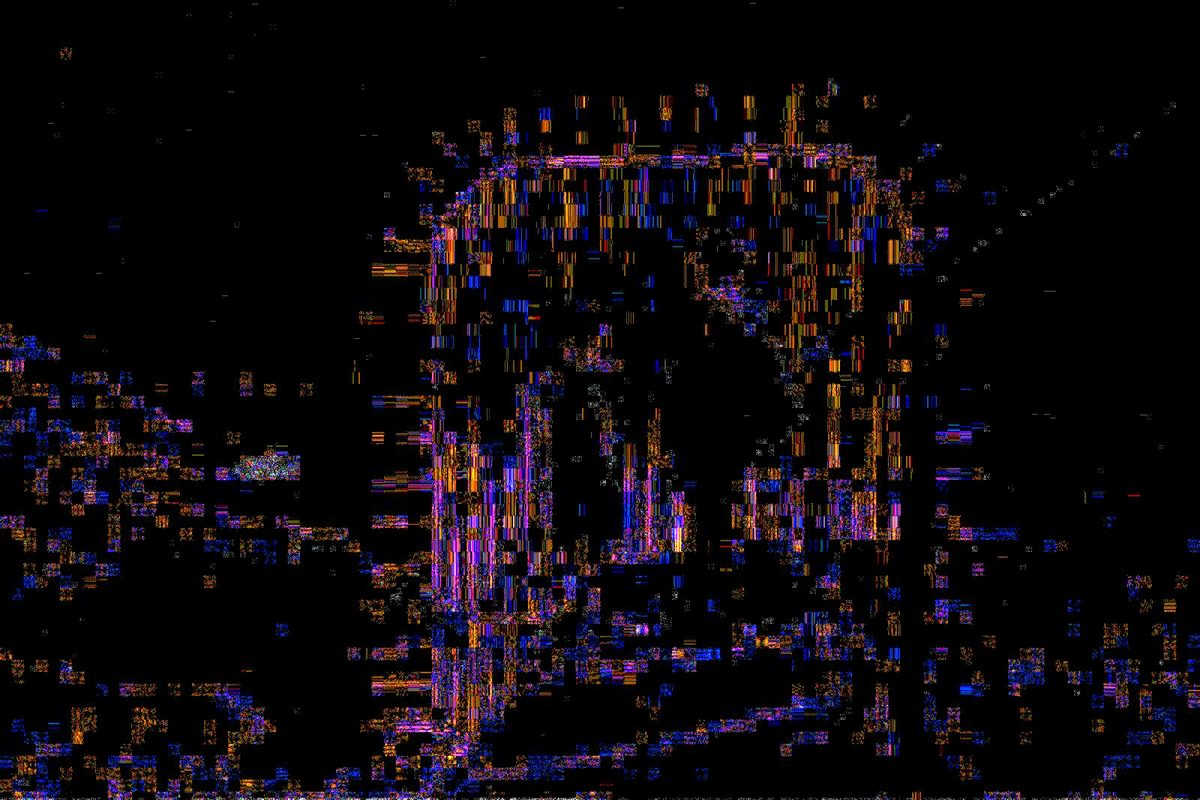
- The pasted boat. It shows as a bright, grainy patch where the water around it is dark. The pasted pixels have not been through the photo's compression the way the rest of the picture has, so they react differently.
- The fence. The metal bars glow just as brightly, and nobody edited them. Sharp, high-contrast edges always light up, so a bright area is only suspicious when nothing in the picture explains it.
- The sky. Smooth, untouched areas stay dark and even. Compare a suspect area with similar surfaces next to it, not with the whole picture.
Try your own photo in photo forensics. It works best on the original file, before it has been re-shared.
How to check if a photo was edited
- Get the original file if you can. Ask the sender for the photo as a file, not a screenshot or a forwarded copy.
- Upload it above. The detector lists every editing trace it finds and gives a plain verdict: editing traces found, AI-assisted edit recorded, or no traces.
- Read the AI result. Even a photo with no editing traces can be entirely AI-generated; the pixel check covers that case.
- Check the rest. Reverse image search for the original, and look at lighting, shadows, edges and text. The guide walks through each check.
Frequently asked questions
Can you tell if a photo has been Photoshopped?
Often, from what the file records: Photoshop writes its name into the Software tag and XMP, keeps an edit history and leaves Adobe markers in the file. This detector reads all of them. It does not analyse pixels for splices, so an edited photo with stripped metadata can read as clean.
Does it detect airbrushing, cloning or face swaps in the pixels?
No. It reports what the file records, not where pixels changed. For face swaps and synthetic images, the deepfake detector and AI image detector analyse the pixels.
It says no editing traces. Is the photo untouched?
If camera EXIF is intact and no editor is recorded, that is consistent with an unedited capture. If all metadata is missing, the file was re-saved by a platform or app that strips everything, and the result says little either way.
What is an AI-assisted edit?
An edit where part of the image was generated by AI inside an editor, such as Adobe Generative Fill or Generative Expand. Adobe records these in XMP, and the detector flags them separately from ordinary edits.
Is this image photoshopped?
Upload it above. If the file still records an editor, an edit history or Adobe markers, it was opened in editing software. If the metadata was stripped, which most platforms do, the file cannot answer and the visual checks decide.
How do I detect photoshopped images?
Two layers. The file layer is what this tool reads: software name, edit history, Adobe markers, date mismatch, Content Credentials actions. The pixel layer is visual: shadow direction, edge quality, repeated texture and broken perspective lines.
Is it free and private?
Yes. Free, no sign-up, and the photo is deleted after analysis.
Related: fake image detector · EXIF viewer · metadata checker · Content Credentials checker · deepfake detector.